
14:32 — now
Your accounts,
on autopilot.
llmpilot books fresh windows on a 24h timeline, watches every account's real limits, and switches to headroom before the wall — while you sleep or ship.
$ brew install alicicek/tap/llmpilot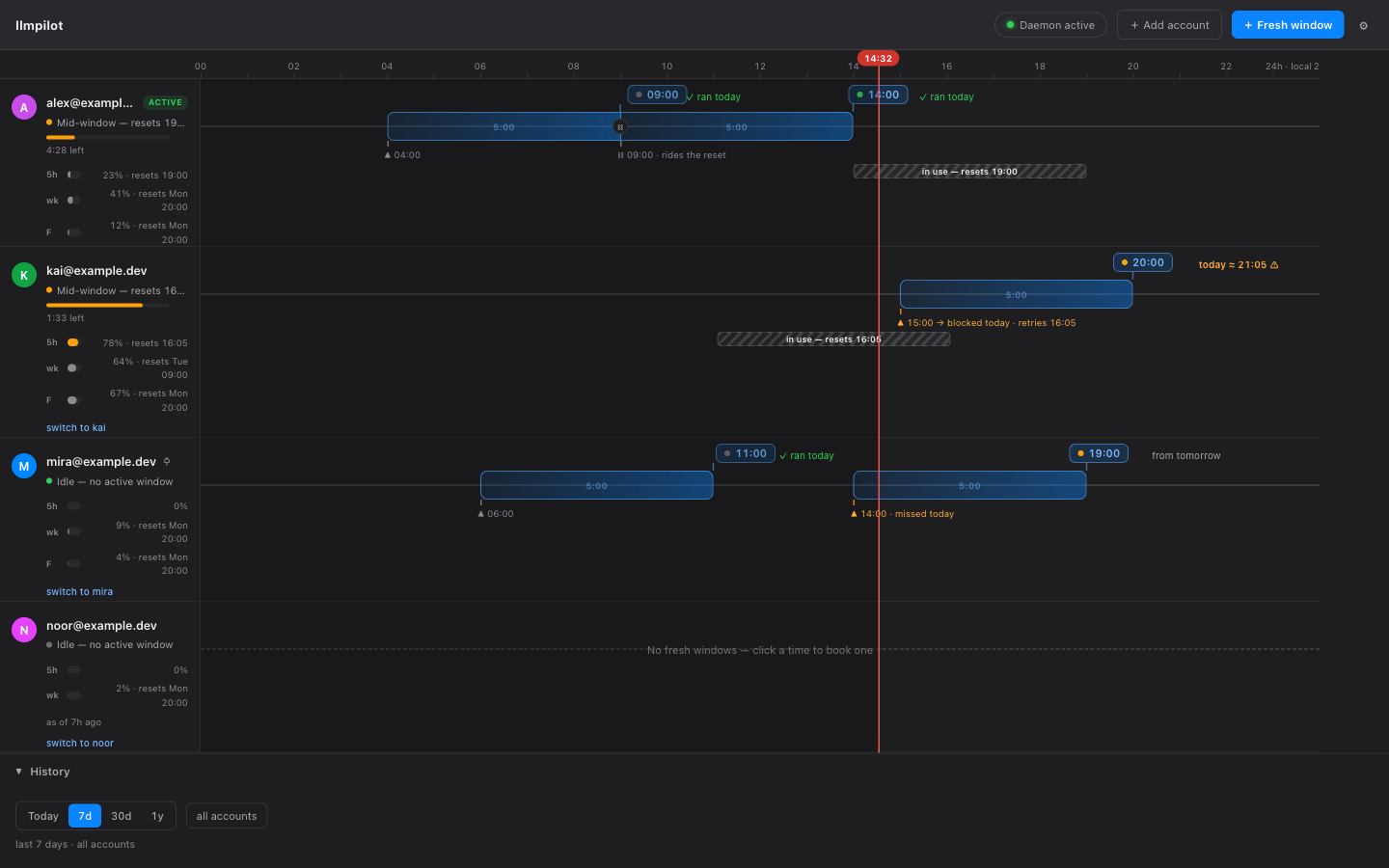
chained — guaranteed · rides the 09:00 reset
fresh window from 04:00 — you were asleep
- chained — guaranteed · rides the 09:00 reset
- fresh window from 04:00 — you were asleep
all day — in your prompt
One line, every account.
The statusline lives inside Claude Code and shows real limits for the account you are on — plus where the autopilot would switch next. This is the real render, from the shipped binary.
- [acct 1/4 | alex@example.dev]
- →noor:2%
- auto:down
drag to reorder — the full editor lives in the cockpitclick a usage segment to cycle percent → bar → time
you plan tomorrow
Plan fresh windows.
Choose when you want full capacity — llmpilot works backward and fires the trigger that opens the window. Drag a reset along the 24h board; positions the physics can't honor are locked and say why.
the real board, masked demo accounts — a chained window rides the 09:00 reset, guaranteed
04:00 — fresh window fired
What runs while you don't.
- watches — real limits, every account
- nudges — fresh windows open on schedule
- switches — headroom before the wall
stale data reads stale — as of 4 min ago, never old numbers in live colors.

the burn-rate projection — it sees the wall coming before you do
19:00 — resets
Install llmpilot.
The core is free and open source. Automatic switching, scheduling, and wake are a one-time Pro purchase.
- open source
- MIT
- zero telemetry
- tokens never leave your Mac
- free core
- one-time Pro
21:05 — the autopilot
Turn on the autopilot.
Pro is the part that acts while you don't. Everything else — statusline, cockpit, menu bar, manual switching, analytics, notifications — is free forever, no sign-up.
- switches automatically — moves you to headroom before the wall
- plans windows — the 24h board, chained resets, catch-up
- wakes the Mac — in time to open the window you booked
£9.99 / $12.99 one-time
Start from the app: a 4-day free trial (card at checkout), then one charge — not a subscription. Checkout opens in your browser, no account, and activation is automatic. Official downloads include Pro; building from source gives you the free app.
questions
Questions.
Does it need my Claude password or API keys?
No. llmpilot uses the OAuth credential Claude Code already stores in your macOS Keychain (with your one-time Always Allow). Switching swaps that credential lock-first, backed up and verified, cooperating with a running claude session. Tokens never leave your Mac.
Is it safe to run multiple accounts?
llmpilot uses your own logged-in accounts — no third-party credentials, and signing in always happens on Anthropic's own page. It reads the same usage endpoint Claude Code's own /usage screen uses, and it never runs a background token-refresh loop. The README carries Anthropic's verbatim credential policy so you can decide informed.
What is free and what is Pro?
The core is free and open source forever: statusline, cockpit, menu bar, manual switching, analytics, notifications. Pro is the autopilot — automatic switching, scheduling, and wake — with a 4-day free trial (card at checkout), then one charge, not a subscription.
Does scheduling work while my Mac is asleep?
It wakes the Mac a couple of minutes early via a privileged helper you set up once. On battery with the lid closed, macOS can defer a wake — llmpilot surfaces a late fire honestly rather than pretending it ran on time.
Any telemetry?
None, ever. No analytics, no tracking, no usage data. The menu bar app checks GitHub for updates; the CLI and daemon make no update check at all. Pro licences re-validate with llmpilot's licensing worker about once a week — a licence id and a random install id, never a Claude token. Every request llmpilot makes is listed in full in SECURITY.md. Cached data holds percentages and reset times only — never tokens.